📈 CASE STUDY · DIGITAL MARKETING
AI Automation for Digital Marketing Agencies
Reporting, briefing, creative variants, lead follow-up — the work that eats your week isn’t the strategy, it’s the repetition around it. We build AI systems that run that repetition for you, so your team sells and creates while the machines handle the rest.
Where an agency’s week actually goes
If you’re running five to ten clients, the same four jobs repeat every week — and each one is mostly copy-paste.
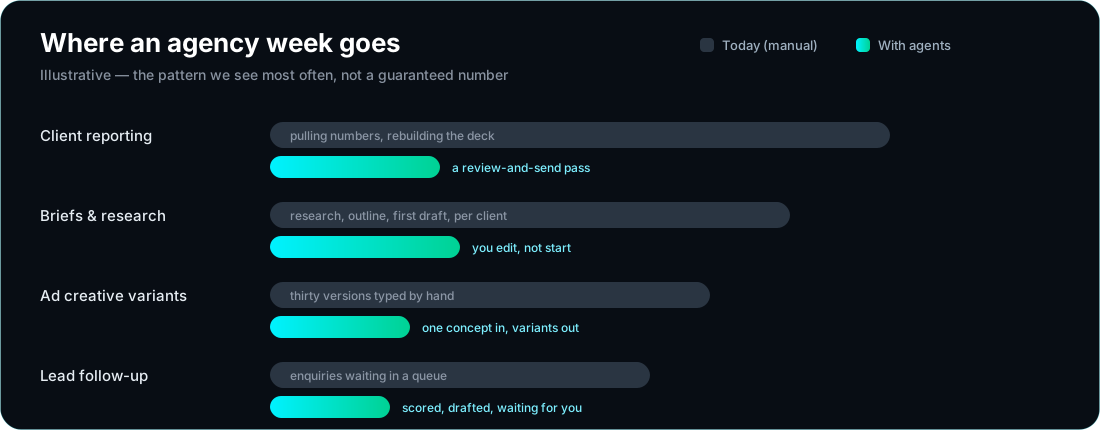
📊 Reporting day, every week
Numbers pulled from GA4, Ads, Meta and the CRM — then rebuilt by hand into a client deck.
✍️ Brief to first draft, times ten
Research, outline, draft, revise — repeated for every client, every month, in a different voice each time.
🎯 Thirty ad variants by hand
One idea, thirty executions — headlines, captions, crops — all typed out one by one.
📥 Leads that go cold in the queue
Enquiries arrive, wait for someone to qualify them, and lose momentum before a reply goes out.
What we automate for agencies
Seven systems we build most often. Each one runs on the same engine, connected to the tools you already use — no rip-and-replace.
📊 Automated client reporting
GA4, Ads and Meta data pulled, summarised and dropped into your branded deck — written in plain English, ready to send.
✍️ Brief → draft pipeline
Research, outline and a first draft in the client’s voice — reviewed by a human before anything ships.
🎯 Ad creative at volume
One winning concept becomes thirty variants — headlines, captions, hooks — split by channel and audience.
🔍 SEO briefs and clusters
Keyword research, content briefs and internal-link maps generated per client — the research layer of SEO, done in minutes.
📥 Inbound lead qualification
Every enquiry scored, enriched and routed — with a drafted reply waiting for your approval before it goes out.
🔁 Content repurposing
One asset becomes LinkedIn posts, X threads, Instagram captions and a newsletter — formatted per platform.
🧪 Brand-voice QA
Every draft checked against the client’s guidelines, tone list and banned words before a human ever reads it.
The engine room
This isn’t a chatbot bolted onto your workflow. It’s an agent stack that runs, checks and improves your production.
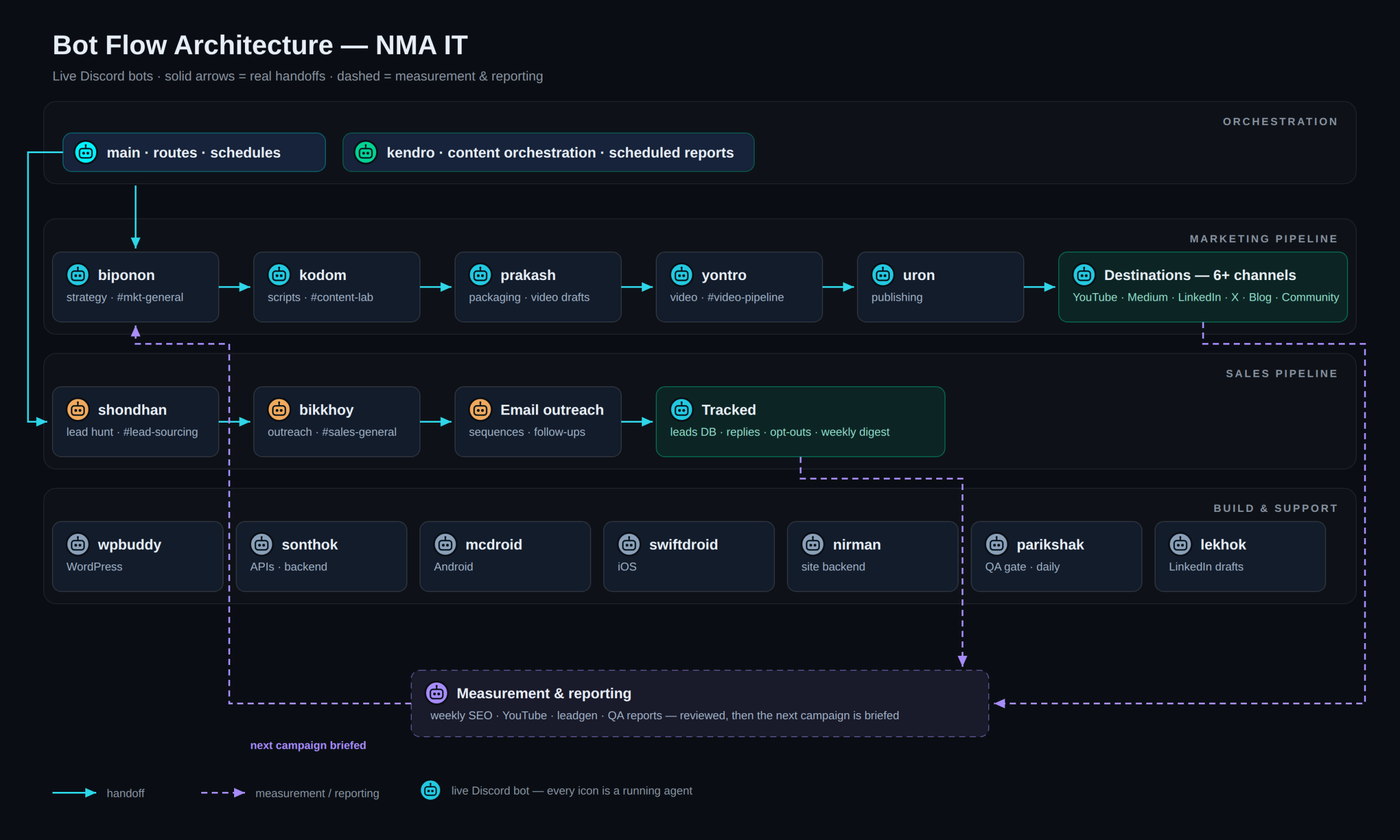
🦾 OpenClaw — the orchestration layer
Runs the agents: scheduling, tool access, approvals and hand-offs between specialist agents — with a human in the loop wherever it matters.
🧠 Hermes engine — the learning layer
Every task is evaluated and stored as a reusable skill. The system gets faster and more accurate the longer you run it — your process knowledge stops living in one person’s head.
🖥️ The control board — one place to watch it work
A live view of every running job, every approval waiting on you, and every hour the system has saved. No black box.
👥 A team of specialist agents
Research, copy, QA, reporting and outreach agents — each with one job, all coordinated by the orchestration layer.
What changes when it’s running
Typical shifts we see once the systems are live — the exact numbers depend on your client mix and tool stack.
- Reporting day shrinks from a full day to a review-and-send pass
- New client onboarding stops being a scramble — the same pipeline runs for client number one and client number fifty
- Creative testing volume goes up because producing variants is no longer the bottleneck
- Nothing sits unanswered overnight: leads are scored and a reply is drafted the moment they arrive
- Your process stops depending on one person remembering how it’s done
How we start
- Free 30-minute audit. We map where your team’s hours actually go and pick the one workflow worth automating first.
- Build. Two to four weeks. Agents are trained on your clients, your voice and your tools.
- Connect. GA4, Ads, Meta, your CRM, Slack, Drive — plugged in, not replaced.
- Scale. Add clients without adding headcount, then automate the next workflow.
Proof, not promises
These pages describe an agency workflow — but the systems underneath are the ones we run every day:
- Our corporate site was designed, written and shipped by an AI agent team
- Our Android releases are built and shipped by an automated pipeline
- Our WordPress backups run, verify and publish themselves
Questions agencies ask us
Do we have to replace our current tools?
No. The automation sits on top of what you already use — GA4, Ads, Meta, your CRM, Slack, Drive, WordPress. Replacing tools is usually the slowest, riskiest path, so we avoid it.
How long until we see something working?
The first workflow is usually live in two to four weeks. We deliberately start with one high-friction job rather than automating everything at once.
Is client data safe?
Access is scoped to the minimum each agent needs, credentials live in a protected store rather than in prompts or logs, and anything client-facing waits for a human approval.
We’re not technical — is that a problem?
It’s the normal case. You work in the tools you already know; the agents run behind them. If you can brief a junior team member, you can brief this system.
What does it cost?
It’s scoped per workflow, not per seat — the audit tells us which workflow pays for itself fastest, and we start there. Most agencies begin with one system and expand once it’s proven.
Let’s find your first automation win
A free 30-minute audit. We’ll map the workflow costing you the most hours and tell you honestly whether AI is the right fix.